Today we started our day doing a peer review with each other for our WordPress websites. I really liked being able to see a peers format and ideas. It made me reflect on the fact that I want to take some time to work on formatting my website to look more user friendly and reflect my thoughts. It was a good reminder though that these spaces are a personal expression of ourselves and our creativity. It’s a really great way of capturing moments and the journey of our education.
Next we moved on to speak about this really neat concept I’ve never heard of before- EdCamp.
EdCamp is an idea that allows for opportunity to facilitate large groups for learning in a democratic way. The goal is to empower educators and give them the choice of speaking about something that is important to them. EdCamp gives space for collaboration and conversation that identify a common theme or topic to explore and what they can teach others about. It takes the pressure off of an educator or individual to be the expert. It’s a great space for individuals to share experiences, generate questions, be curious and explore a topic in more depth.
In class today, we ran a mini EdCamp to explore certain topics that were proposed in class. We all had the opportunity to come up with ideas. After everyone contributed, we were give stickers and we got to vote on our top three that we were interested in speak about in more detail. Through this voting system, Michael chose the top 4 and we got to chose which topic we wanted to follow and speak about in more detail. Ideally, this would last longer and the groups would be closer together which would allow peoples to vote with their feet, encouraging individuals to move from topic to topic. Today though, I stayed with one group. We spoke about how to incorporate and support gardening within a classroom. It was really great to hear a group of people who were passionate about a topic come together and purpose ideas and speak positively about a topic. To highlight some of the conversations:
-can be used in indoor and outdoor spaces
-community or collective gardening
-gardening is experiential but here is a lot of cross curricular and curricular outcomes,
How are students and teachers using AI to support SEL?
This week I wanted to look specifically into how students are using AI as a tool for support. Now I need to be upfront, my thoughts about AI are not great. I see benefits, but when it comes to SEL, I don’t feel AI by itself is a good tool. It can supplement learning but I don’t feel it should be relied on solely and in a setting without additional tools and strategies in a social context. The reason I want to be upfront about my bias is because it may show in this post, but I’m going to try my best to take an open and curious approach.
To begin, kids are using AI. It came fast and there is no rule book. AI is being developed faster than the legislation and regulations needed to keep on top of it. And younger generations are becoming more efficient at using and naviagting technology than the adults which can lead to potential gaps in understanding how to move forward in a healthy way.
In saying this, there are benefits to AI and people are embracing what it has to offer. There is a lot of information on the internet. And it’s all a double edge sword. There are benefits and there are drawbacks to using AI as a SEL tool. And we can’t ignorer the mental health crisis that seems to be surrounding our communities that has also been linked to the development and increased use of technology including social media.
I found this really interesting book on supporting SEL through AI. It made some interesting points. Below is a link and a download if you wish to read more in depth. Here was their conclusive findings:
“AI-based systems such as therapeutic chatbots, virtual assistants, and SARs have a strong potential to positively impact mental health by helping people deal with depression and anxiety, as well as offer a sense of companionship, evoke emotional attachment, and even assist with social and emotional development. While some concerns regarding the effectiveness, dependability, and cost of this technology still exist, we hope that as technology progresses and becomes more affordable, people will increasingly benefit from AI-based tools to improve their social and emotional well-being.”
What I find so interesting about all of this is SEL is deeply connected in human interaction. There are some aspects of SEL such as self regulation that are more independently learnt but still relies on co-regulation and your environment. It’s not something that an be learnt or taught by being in a room with yourself and a computer or technology device. Although AI is getting more advanced every day, it lacks this human touch. You can not replace human beings and human learning with AI. Humans posses qualities such as critical thinking, empathy and creativity that can not be replicated in AI. Students need to be able to connect and develop relationships in order for SEL to be successful but AI has a place in this learning as a supportive tool.
Another article I found that was a really informative read is linked below. It. highlights many of the questions that we ask ourselves as students, educators, parents and humans.
I believe that it does a great job at looking at AI as a tool. I feel they summed it up quite well here:
“AI-driven tools demonstrate the ability to improve and enhance SEL programs. Although AI tools cannot entirely substitute for the unique abilities that define human teachers, like critical thinking, emotional connection with students, immediate understanding, human interaction, and the ability to comprehend complex issues, AI tools are useful and valuable in the education sector because they facilitate self-reflection, stimulate creative thinking, and improve overall learning productivity.”
This Youtube video was taken from the article linked above.
Lastly, I also took a look into ChatGPT. I think this is one of the biggest AI tools that some children and youth are using for advice and a sense of companionship. It’s very accessible and comes at no cost to the user. The concerns about ChatCPT with children and youth are the same as the AI concerns listed above. For SEL, some children are having intense conversations with ChatGPT and seeking advice that may not be appropriate and can possibly be unsafe or harmful. Here are some key points to consider:
Misinformation and inaccuracy:ChatGPT can generate responses based on vast datasets, which may contain outdated or incorrect information, potentially misleading children who lack the critical thinking skills to verify facts.
Reduced critical thinking:Constantly relying on ChatGPT for answers can discourage children from actively researching and evaluating information, hindering their ability to think critically and solve problems independently.
Over-reliance on AI:Children may become overly dependent on ChatGPT, leading to a lack of personal responsibility and initiative in decision-making.
Bias in responses:As AI learns from large datasets, it can reflect biases present in that data, potentially providing biased or harmful information to children.
Inappropriate content:Depending on the questions asked, ChatGPT may generate responses that are sexually suggestive, violent, or otherwise inappropriate for children.
Privacy concerns:Children may unknowingly share personal information with ChatGPT, raising concerns about data collection and privacy.
What parents and educators can do:
Monitor usage:Actively supervise children’s interactions with ChatGPT and discuss the responses they receive.
Teach critical thinking:Encourage children to verify information provided by ChatGPT with other reliable sources and to evaluate the credibility of the answers.
Open communication:Have open conversations with children about the limitations of AI and the importance of independent thinking.
Age-appropriate use:Consider age restrictions and only allow children to use ChatGPT with appropriate supervision.
Use educational tools:Explore child-friendly AI platforms designed specifically for learning and development.
So in closing, I see AI as a benefit to SEL but it needs to be used intentionally and appropriately. All the research and information agrees it can be a great too to supplement learning but should not be relied upon solely.
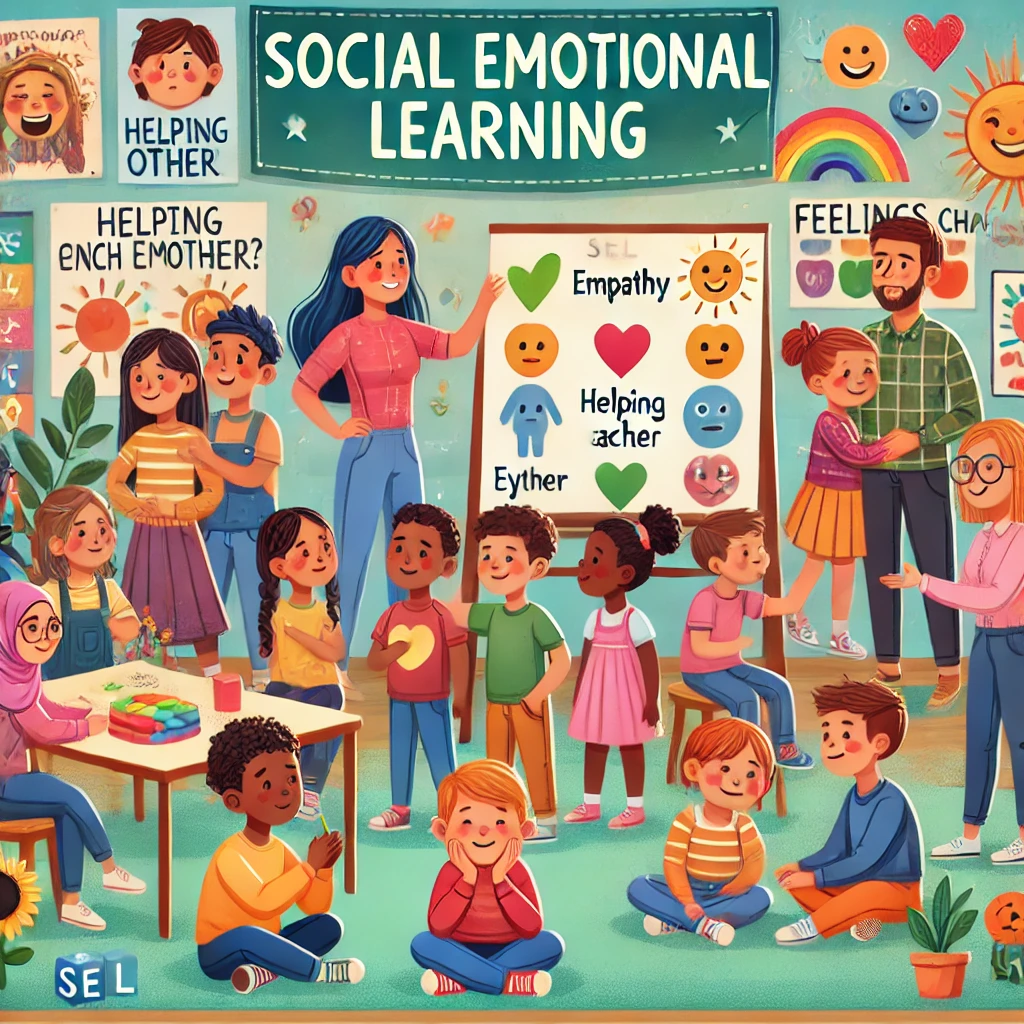
*Picture generated using ChatGPT (“please generate a picture of social emotional learning”)
Today we did a class meeting via Zoom. I know there can be downfalls to Zoom but I actually really like it. I definitely miss the social aspect of learning but it was nice as a one off. I was able to still focus on the class while also get my daughter to her soccer tournament and I appreciate that aspect!
So in saying that, because I was in my truck at my daughter’s soccer game, I played around with the blurred background image hoping people wouldn’t notice where I was. I didn’t quite work, people were still able to guess I was in a vehicle but it was definitely better than not having that option. I’ll need to go back into Zoom and play around with the different virtual background and see if there is something that may work better next time.
I also didn’t know that you can use Zoom to record and make videos. It makes sense but I just never thought about Zoom in that way. It would obviously really benefit if you had multiple users making a video together but I could also just use Zoom to produce videos on my own.
Another different way to make videos and to store and share information is through YouTube. I have to admit, I’ve never really been a YouTube person. I’ll access some videos if I’m trying to learn about a topic or do some research, but I haven’t used it for much more than that. Today also happened to be the 20th anniversary of Youtube!! I know 20 years sounds like a long time, but it reminds me that technology and educational technology is still pretty new. It’s developing at a rapid pace but we are still learning so much. Michael mentioned having a YouTube profile that maintains a lower profile is also a great way to produce educational videos or a great way to connect and share with your students. We can create a profile that is ‘unlisted’ and it is very accessible at little to no cost. This is something I have never thought about before but I can see the benefits. I’d really like to look into this topic more deeply. I think it’s a great option for someone like me who isn’t very techy but is still looking to be a part of the educational technology world.
Here is the first YouTube video that was uploaded and shared with the world 20 years ago.
Videos made in Zoom and YouTube are a way of building my resource library as a teacher candidate that will help me support and connect with my future learners but I also wanted to think more about digital curation. I currently have just started using Google docs to store and share my work. Before that, I just kept files on my computer and they were somewhat organized but didn’t really allow me to network with other people. What I like most about Google docs is that we can share resources quite easily and I can open these documents and resources from any other computer. It’s not just locked into my own files on my own computer.
With my digital curation, some tips I took away from today’s class was to be intentional, use good names so it’s easier to remember and find things and to get started! Being a networked teacher and having another way to connect with others teachers and students will not only make my life easier but it’s a great form of multi-modal learning and ties into UDL. I need to stop thinking of educational technology as something outside of my scope that I don’t know anything about. It doesn’t need to be complicated and I can use the tools I already know and build from there.
This week we had a guest speaker named Rich McCue from the Digital Scholarship Commons at UVIC. He came in to help us learn, practice and navigate video and audio literacy. Specifically, we spoke about iMovie and podcast creations.
Since I am completely new to this learning, I found today really challenging. I found some of the language being used in class intimidating in the sense that I didn’t really know what it meant and I was pretty slow at navigating the information but the good news is, the website that we were using to practice was pretty user friendly!
I didn’t manage to get through all the steps in the practice guide, but this is the video I made so far. I was able to open and navigate iMovie as well as cut, edit, splice and add audio.
I also think it would be a really great idea for me to go check out the Learning Commons or the Digital Scholarship Commons. Rich mentioned there are a lot of free resources including 3D printers, workshops, generative AI, video editing and podcasting materials as well as additional information. This also includes borrowing gear/equipment which may be really great for some of our podcast assignments coming up this term.
So unfortunately, I was so slow in learning the iMovie that I didn’t get to play around much with the podcast practice but I look forward to reading through the slides and taking my time.
Additional to the learning, Rich offered some great tips. When making videos, Rich suggested using stabilizers or tripods, use external audio, be aware of wind or outside noise that may come across in your audio, test audio on location and again, be aware of surroundings that may distract from your video success. He also gave us some editing tips. The one I got to test out today was to scrub through the video and to use the space bar when pausing and playing to make cuts or edits. This seemed to work out well, but I have lots more practicing to do:)
Lastly, Rich gave a really interesting piece of advice and that was satisfaction rates go down dramatically with bad audio (vs video). So my main take away today was to keep practicing and pay extremely close attention to all his audio tips and tricks when making videos or podcasts if I want to be successful.
So far I’ve defined SEL, looked at a great website that offered tons of education and resources, looked into CBT, took a deeper dive into what social emotional apps were available for both students, teachers and individuals and now I want to look at what does the BC Curriculum say about social emotional learning?
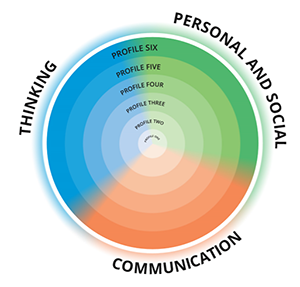
As a teacher candidate, if I’m passionate about SEL it’s important that I have support through the curriculum. Looking at teaching the whole learner is a concept that is fairly new. It’s only been in the last 10 years that SEL has been on the curriculum agenda. In 2015, the BC government developed a new education curriculum that included the development of the Core Competencies. The Core Competencies are sets of intellectual, personal, and social and emotional proficiencies that all students need in order to engage in deep, lifelong learning. They are cross curricular and develop when students are engaged in areas of learning. The three major headings are communication, thinking, personal & social.
To unpack these three headings of the Core Competencies, the BC Curriculum website (listed above) does a good job of providing a definition and expectation about how it fits and is to be incorporated into the curriculum. There are also Sub-Competencies that fit within each Core Competency. I found these Sub- Competencies super interesting. The Core Competencies are interrelated and interdependent and each Sub-competency is naturally intertwined with all the other Sub-Competencies. As students move through the profiles in one Sub-Competency, their growth will influence development in other Sub-Competencies. These Sub-Competencies are called Facets, Profiles and Connections. There is also a tab of Illustrations that provides very detailed examples of what that learning may look like. The Illustrations give the teacher examples on what they may see but also guides the teacher in examples they can use in class or actives they can set up to create a classroom culture of SEL.
Needless to say, I’m quite impressed with this area of the BC Curriculum website but unless a teacher or teacher candidate has experience with SEL, I can see how it still may be questionable about how to support or teach SEL in the classroom. The good news is most schools have a team to help support, guide and provide resources. Your inclusion support team at your school may have access to activities or be able to help guide you through assessing this learning in your classroom. Part of inclusion support is also school based teams and if a student is having a particularly hard time or may need additional support and communication outside of the class, school based teams can help provide resource. In SD62, they also have student engagement facilitators. Student engagement facilitators have more specialized training in social emotional support and may be able to offer your student additional learning individually or in groups. Another great resource is your school counsellor! A lot of the time, the school counsellor will have activities, resources or ideas to help support the classroom. So remember, you’re not alone! It takes a village!
As a teacher, it doesn’t need to be hard or big detailed lessons. It can be small, everyday tasks that you start with your classroom. A simple SEL Google search, Pinterest search or image search will also provide you with thousand of resources at your fingertips. Here are a few examples of everyday smaller examples of SEL that can add up:
journalling
mindlfulness
check-ins
positive affirmations
self awareness
active listening
celebrations of diversity or successes
classroom contracts
So I encourage you to check out the BC Curriculum website and get to know the people in your schools who specialize more in SEL and may be a great resource for you as a teacher and an amazing support for your learners!
Over the last couple weeks I’ve defined social emotional learning, took a look at a great resource, CASEL, and explained how Cognitive Behavioural Therapy is being used to help manage all emotions including anxiety. This week I wanted to use the theme of our technology class to specifically look into what apps are available for SEL and mental health.
I often see a lot of advertisements for different apps targeting social emotional learning and anxiety. I did a web search and asked for ‘social emotional apps to use on my iphone’. This is the list that was generated from that search:
Apps seem to be a popular tool for a lot of individuals. There is such a wide range for all types of support and all types of ages. The apps available for younger children look at identifying emotions, self control, understanding mindfulness, stress management, how to stay calm (calm bodies), focus, problem solving and how to communicate. Some apps target the individual, some engage parent participation, and others are tools for teachers to use with their classrooms. The apps that target youth and more middle school aged learners begin to speak more about the social emotional learning connection, mood, behaviour, tools and strategies, zones of regulation and a deeper understanding of all the same topics that were listed with the younger apps. The apps that are for adults tend to focus more on breathing, meditation, stress management and again, all the same topics as above but more age appropriate.
What I really like about all the different apps is their ability to link the content and the language to the target audience. I was also really surprised to see how many apps are available for classroom use.
When asked for ‘apps that teachers can use to teach social emotional learning in the classroom’, I got this list:
The biggest difference with the second list is some of these apps are classified as educational technology and offer more suggestions such as virtual reality. There is also a bigger focus on social stories, cooperation, communication and geared towards helping teachers target the social emotional learning curriculum.
Needless to say, there is no shortage of options and I have no doubt there is something out there for everyone.
After this search and looking at all these different apps, I wanted to find one for myself to use as a tool for managing anxiety. What I found really frustrating about many of these apps is that they are not free. Some offer a free trial but most come with a monthly, annual or lifetime subscription. Although I appreciate the free trial to see if I’d like the app, I still find I’m pretty turned off by the cost. This is something to keep in mind if I planned on using an app as a tool for either myself or my future classroom. Because of the cost, at this time I will take some of the suggestions I found in the apps such as using music, meditation and breathing strategies to help manage my anxiety but I won’t be downloading any apps for myself at this time. It’s possible that as a teacher candidate I may be a part of a school that funds and supports similar apps to use within the classroom and I look forward to learning and discovering more as technology continues to grow and develop.
And I feel the need to point out that although use technology and tools such as apps is a great addition to social emotional learning, I believe it should remain just that…..a tool! I believe humans still learn these skills best through human interactions within their environments. Technology should not be the only form of education that we engage with. Social emotional learning depends on human interaction within a supportive, kind and nurturing environment. It will be a form of trail and error and can be situationally dependant. Our children need to engage, collaborate, play, learn and live in order to develop these skills that are very dependent on connection.